What changed in this update?
Find added or deleted activities and relationships, logic, duration, calendar, lag, actual-date, float, and longest-path changes.
P6 intelligence for project controls teams
Keep the baseline and every monthly XER update in one browser-based project record. Identify when slippage begins and follow changes in longest paths, milestones, and costs. Preserve the schedule evidence supporting delay, impact, and time-extension reviews.
Free · No account required
The whole project, from baseline to latest
Schedule Tracker keeps recurring XER updates together. Review the current schedule alongside earlier updates to follow the changes and decisions that brought the project to this point.
Find added or deleted activities and relationships, logic, duration, calendar, lag, actual-date, float, and longest-path changes.
Follow forecast completion, milestone progression, missed planned dates, and activities moving into limited or negative float.
Review the exported P6 longest path, see activities entering or leaving it, and relate path movement to the current completion forecast.
Preserve a contemporaneous record of schedule quality, logic changes, progress, milestones, costs, and driving work for professional review.
Start with one XER
The free check gives you a single-schedule preview without an account. When you need the whole project history, bring the baseline and recurring updates into one project for comparison, trend, and history reports.
Run a free XER checkMore than a change dump
Move from thousands of schedule fields to the findings a reviewer can actually use.
Review measured results, thresholds, and supporting findings across the DCMA assessment, with unavailable checks clearly identified.
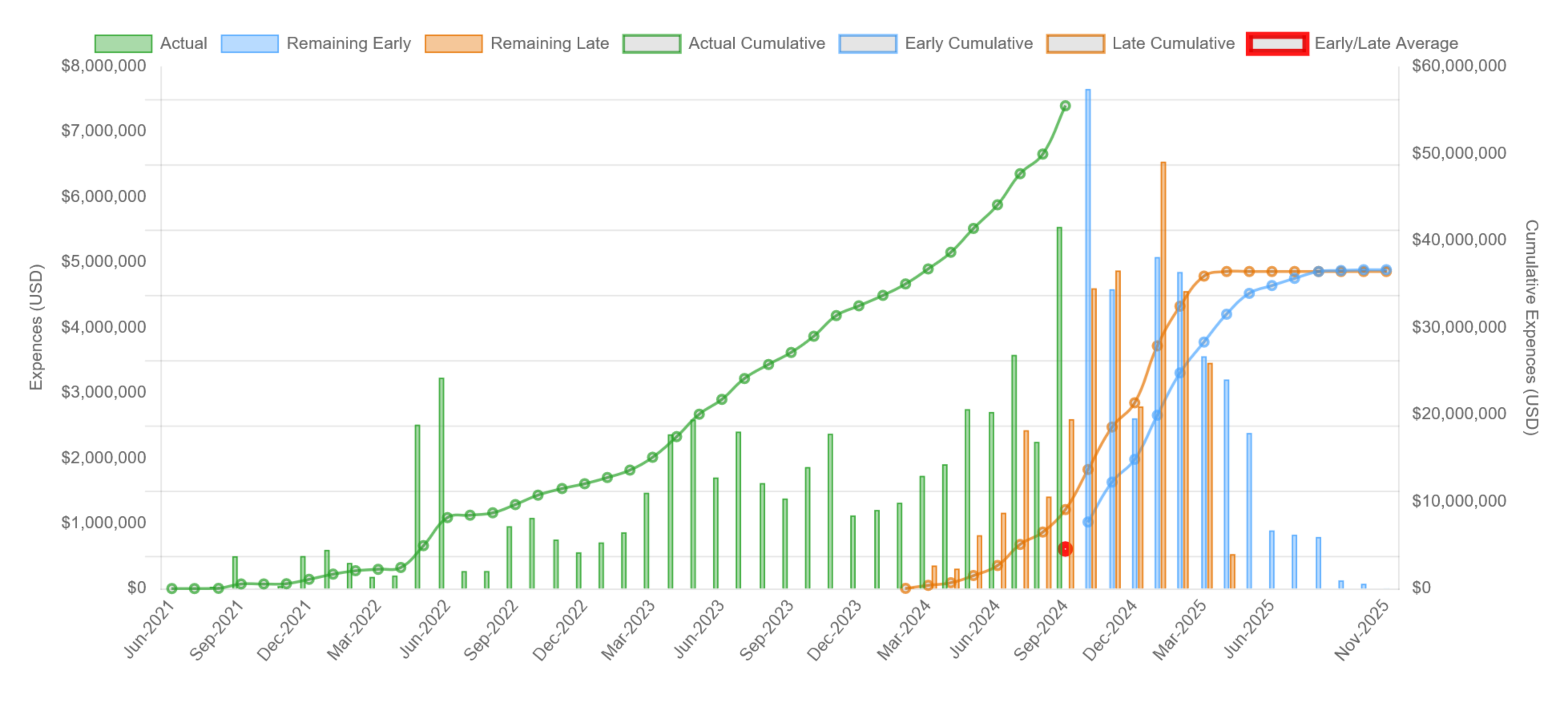
Explore the assessmentSee milestone dates, completion forecasts, activity costs, and project cost curves move across successive updates.
Explore project controlsOrganize path shifts, logic changes, milestone movement, missed dates, and progress into a clearer record for impact and time-extension review.
Explore delay reviewSee the actual reports
Open either image for a closer look, or explore the complete sample project report.
Explore the sample project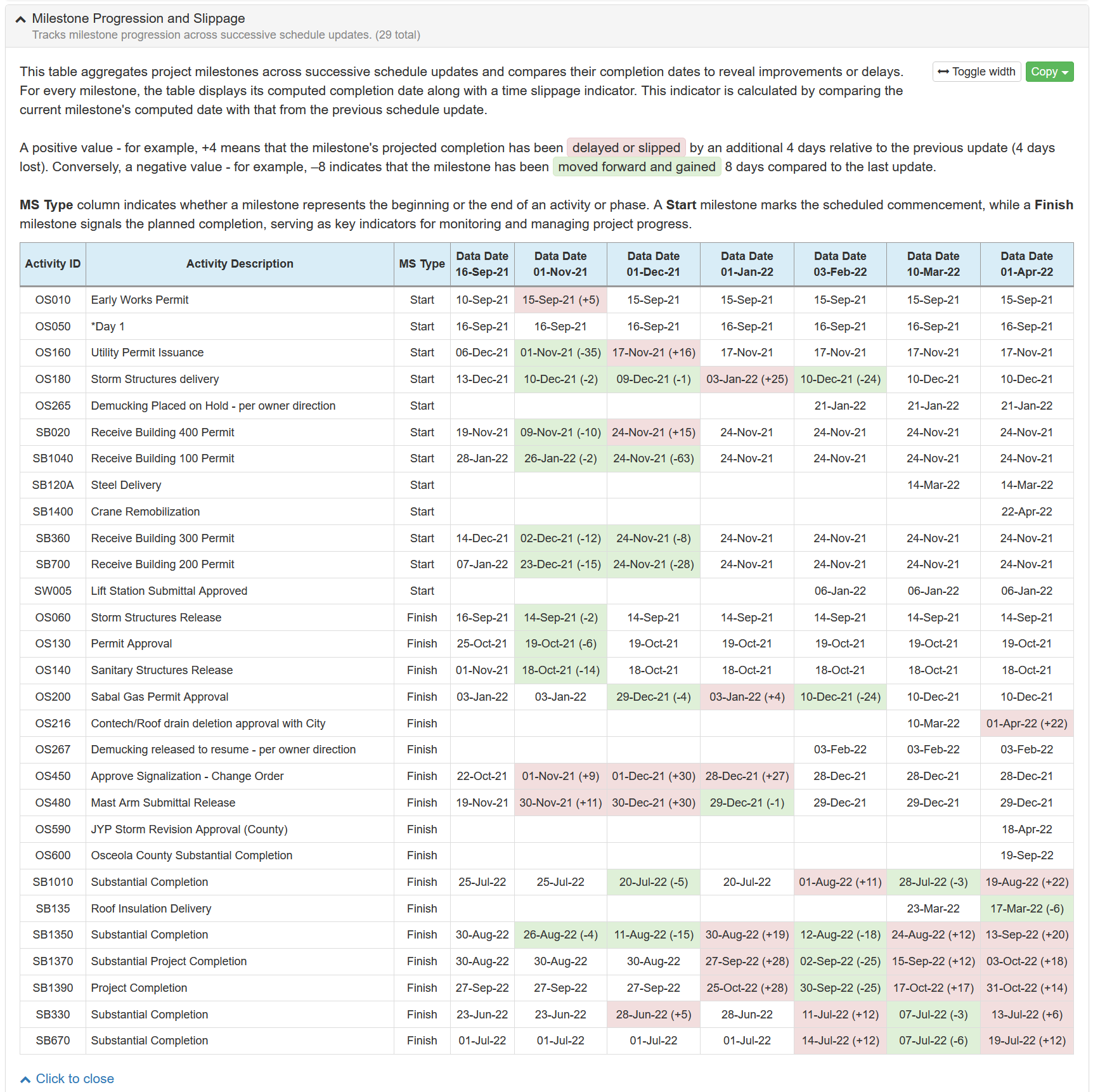
Evidence, not automatic conclusions
Schedule Tracker organizes repeatable CPM checks, comparisons, and project-history evidence. It does not determine causation, concurrency, entitlement, or responsibility, and it does not replace the contract, supporting project records, or the analysis of a qualified professional.
P6 schedule questions
No. The free check reviews one XER as a single-schedule preview. The full product keeps your baseline and successive updates in one project history. Compare selected periods and follow changes in milestones, completion, paths, costs, and performance over time.
You can import up to 20 XER files together. Schedule Tracker organizes them by project and data date, and you can add later updates as the project continues.
No. Primavera P6 remains the scheduling system. Schedule Tracker analyzes exported XER files in a browser and organizes the review record without editing the source file or requiring a direct P6 database connection.
No. It organizes schedule evidence such as logic changes, milestone movement, float changes, missed dates, and longest-path shifts. Causation, concurrency, entitlement, responsibility, and the appropriate methodology require the contract, supporting project records, and professional judgment.
Built from real schedule reviews
Schedule Tracker was developed by Alexandra Kay, PE, CCM, MBA, a licensed Professional Engineer, practicing CEI Senior Project Engineer, and former senior Primavera P6 scheduler. Since 2017, it has been used, trusted, and tested by project professionals working on major Florida infrastructure projects, including work for the Florida Department of Transportation (FDOT), Central Florida Expressway Authority (CFX), Jacksonville Transportation Authority (JTA), and other public agencies.
Employer names identify where individual users work, and agency names describe project context. They do not imply employer or agency endorsement, sponsorship, affiliation, procurement, or organization-wide adoption.
Make every update easier to explain
See what matters in one schedule, then build the complete project history.